← All toolsReceipt generator

Rekenbox · 2026

Receipt generator

Record a received payment with the amount in words, VAT and a signature.
Amount received€121.00View calculation ↓

Start with fictional example details. Enter your own information; the document updates immediately.

1Payment received
2Recipient and payer
3Number and VAT
4Signature

Signature

Draw with your finger, stylus or mouse. Leave it blank to sign on paper later.

Signature
Blank signature space
Amount received€121.00
Your document, updated liveA4 · PDF

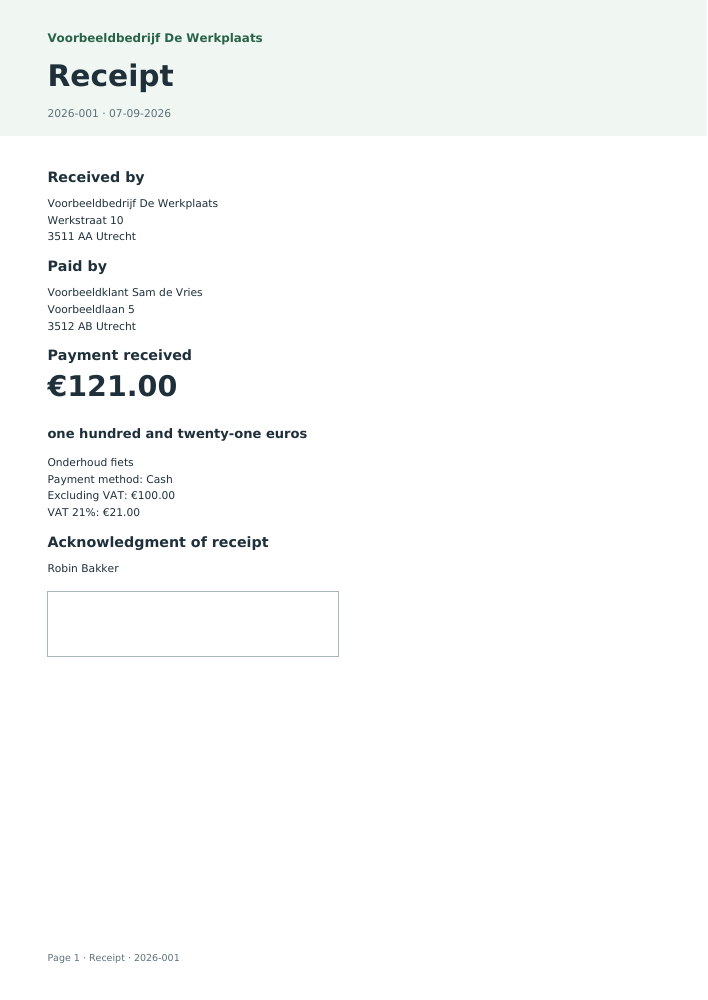
Voorbeeldbedrijf De Werkplaats

Receipt

№ 2026-00107-09-2026

Employer / recipient

Voorbeeldbedrijf De Werkplaats

Werkstraat 10
3511 AA Utrecht

Paid by

Voorbeeldklant Sam de Vries

Voorbeeldlaan 5
3512 AB Utrecht

Amount received€121.00

one hundred and twenty-one euros

Onderhoud fiets

Payment method
Cash
Excluding VAT
€100.00
21% VAT
€21.00
Signature · Robin Bakker
Receipt · Based on your inputs
Amount in words
one hundred and twenty-one euros
Excluding VAT
€100.00
VAT
€21.00
Assumptions, sources and version

2026 · nl-2026.1 · v2026.1

  • A receipt records payment received. It does not replace an invoice meeting VAT requirements.

Keep your documents together

With Access: your branding, sequential numbering, document archive and direct email. The standard PDF above is free.

Explore Access →

Rather outsource it?

Send and track your invoices

Create invoices in Winstwaker, send them and keep track of outstanding amounts together with your bookkeeping.

See invoicing in Winstwaker ↗
Bulk · Calculate your entire list
Save on this device for free

Understand your result

How this tool works

A receipt is written evidence that someone received a payment. It records the payer, recipient, purpose and payment date. This is useful for a cash payment for a repair or a second-hand purchase. Replace the fictional example above with your own details. The amount updates immediately in numerals and words.

An invoice and a receipt serve different purposes. An invoice describes the supply and amount payable; a receipt confirms money received. If an invoice already exists, include its number as a reference so the payment can be matched to the correct debt.

Extracting VAT from the payment

Excluding VAT = payment received ÷ (1 + VAT% / 100)

Enter the total received. Enable the breakdown only if VAT applies and select the correct rate. The tool divides the payment by one plus the VAT rate and rounds to cents. VAT is the difference between total and net, keeping the figures consistent. Showing VAT on a receipt does not automatically turn it into a compliant VAT invoice.

Numbering, signing and keeping records

Give the receipt an identifiable number. Draw a signature on screen or leave the space blank for signing on paper. With Access, archiving reserves the next number for that year and document type. Keep business receipts with your records: Dutch basic tax records generally require seven years of retention. Check whether any of your records have a longer retention period.

From entries to a PDF

Entered details and signatures remain on this device while you create the document. Archiving with Access stores it encrypted in your account. Before emailing, review the archived version and the recipient’s address. Save, print or send the free PDF yourself.

Sample PDF: Receipt generator
View the worked example

This document was generated using the tool’s fictional example details. Your download contains your own entries.

Download sample · PDF

Common questions

What belongs on a receipt?

Include recipient, payer, amount, date and purpose. Add the payment method, an identifiable number and signature. Chamber of Commerce and VAT numbers can help with business records.

Is a receipt required for cash payments?

Article 6:48 of the Dutch Civil Code requires the creditor to issue a receipt upon payment unless agreement, custom or fairness imply otherwise. The rule is not limited to cash payments.

How does it differ from an invoice?

An invoice records what was supplied and what is owed. A receipt records payment received. A VAT invoice may still be required.

Can I record a bank transfer?

Yes. Select bank transfer and use the date received. Keep the bank statement and include the original invoice reference where possible.

Can I add my logo and email the receipt?

Access adds branding, numbering and archiving. Email a reviewed recipient from the archived version. The PDF without custom branding remains free.

Which details do you need?
  • Amount received
  • Payment for
  • Date
  • Payment method
  • Company name
  • Company address
  • Company postcode and city
  • Customer / payer name
  • Customer address
  • Customer postcode and city
  • Recipient Chamber of Commerce number (optional)
  • Recipient VAT number (optional)
  • Payer Chamber of Commerce number (optional)
  • Payer VAT number (optional)
  • Document number
  • Invoice reference
  • Split VAT from amount received
  • VAT rate
  • Recipient / signatory name
  • Signature
  • Notes
Limits of this tool
  • A receipt records payment received. It does not replace an invoice meeting VAT requirements.

Year: 2026 · Version 2026.1

Sources for this tool

Prepared by the Rekenbox product team at Winstwaker. The listed source references and calculation version make the method traceable. Report a content error Last updated: 2026-09-07. Rekenbox is a product by Winstwaker. The tool applies a calculation model to your inputs; a result or paid report is not a personal assessment by an adviser.