
← All toolsWork order generator

Rekenbox · 2026

Work order generator

Record hours and materials and let the customer sign for completed work.
Work order incl. VAT€187.55View calculation ↓

Start with fictional example details. Enter your own information; the document updates immediately.

1Work and customer
2Hours and materials
Hours and materials
Row 1
Row 2

Up to 25 rows in this editor. More rows and saving with access.

3Company and work location
4Completion and approval

Customer signature

Draw with your finger, stylus or mouse. Leave it blank to sign on paper later.

Customer signature
Blank signature space
Work order incl. VAT€187.55
Your document, updated liveA4 · PDF

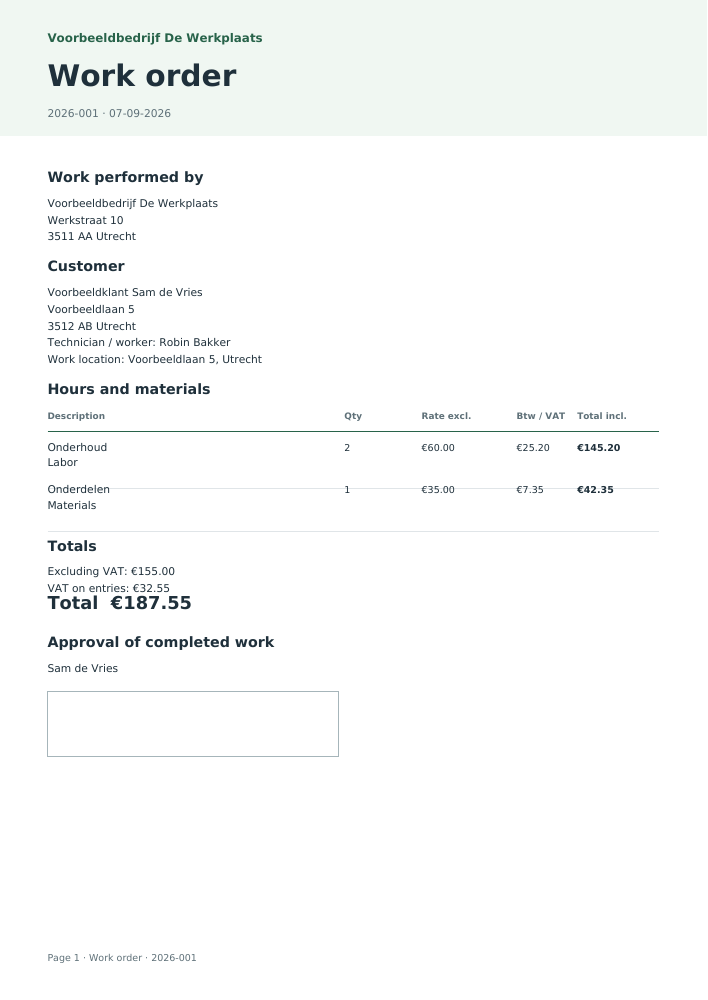
Voorbeeldbedrijf De Werkplaats

Work order

№ 2026-00107-09-2026

Employer / recipient

Voorbeeldbedrijf De Werkplaats

Werkstraat 10
3511 AA Utrecht

Customer

Voorbeeldklant Sam de Vries

Voorbeeldlaan 5
3512 AB Utrecht

DescriptionQtyTotal incl.
OnderhoudLabor · €60.00 excl. VAT2€145.20
OnderdelenMaterials · €35.00 excl. VAT1€42.35
Total€187.55

Including VAT €32.55

Signature · Sam de Vries
Work order · Based on your inputs
Excluding VAT
€155.00
VAT on entries
€32.55
Labor
€145.20
Materials
€42.35

Line breakdown

DateDescriptionCategoryQuantity / kmRate €Excl. VAT €VAT €Total €
2026-09-07OnderhoudLabor260.00120.0025.20145.20
2026-09-07OnderdelenMaterials135.0035.007.3542.35
Assumptions, sources and version

2026 · nl-2026.1 · v2026.1

  • Hourly rates and material prices exclude VAT. A work order is not an invoice.

From completed work to invoice

Transfer customer details, work date, hours and materials. Complete your VAT ID, Chamber of Commerce number and invoice number in the invoice.

Create an invoice from this · Access →

Keep your documents together

With Access: your branding, sequential numbering, document archive and direct email. The standard PDF above is free.

Explore Access →

Rather outsource it?

Send and track your invoices

Create invoices in Winstwaker, send them and keep track of outstanding amounts together with your bookkeeping.

See invoicing in Winstwaker ↗
Bulk · Calculate your entire list
Save on this device for free

Understand your result

How this tool works

A work order records a completed assignment. The technician or employee enters the customer, work date and hours and materials used. The customer can sign on screen after completion. Both parties then have the same record before an invoice is created.

Start with customer and worker details. Add a separate line for each activity or material. Use specific descriptions: two hours of maintenance plus a separately listed spare part are easier to check than one line labelled “various services”. Use notes for observations, checks performed or outstanding work.

Adding hours and materials

Net line amount = hours or units × rate or price

Labor is hours multiplied by the hourly rate. Materials are units multiplied by unit price. Both prices exclude VAT. Each net line amount is rounded to cents before VAT is added. Select the rate applicable to the actual supply; the tool does not determine which VAT rate legally applies.

Recording approval and invoicing

Let the customer review the work before signing. Undo, clear and redraw the signature, including on a phone. The signature records the entered details; what approval means depends on your agreement. With Access, the invoice button transfers the customer, date and lines with a positive quantity. Complete your business tax details and invoice number and review the payment deadline.

Keeping and sharing the work order

Entered details and signatures remain on this device while you create the document. Archiving with Access stores it encrypted in your account. Before emailing, review the archived version and the recipient’s address. Save, print or send the free PDF yourself.

Sample PDF: Work order generator
View the worked example

This document was generated using the tool’s fictional example details. Your download contains your own entries.

Download sample · PDF

Common questions

What belongs on a work order?

Customer and work location, worker, date, specific work, hours, materials and relevant notes. Add prices and a signature if appropriate for the assignment.

Is a work order an invoice?

No. A work order documents completion and approval. An invoice additionally contains required invoicing and payment information.

Can the customer sign on a phone?

Yes. Open the signature section and draw with a finger or stylus. Review the preview afterwards. Undo the last stroke or clear the entire signature.

How do I turn it into an invoice?

With Access, use the invoice button below the result. Customer, work date and lines transfer. Complete missing invoice details and review the new invoice.

How many lines can I use?

The free table supports up to 25 lines. For lists of complete work orders, use credit-based bulk processing; each template row is one work order.

Which details do you need?
  • Customer / payer name
  • Customer address
  • Customer postcode and city
  • Date
  • Technician / worker
  • Hours and materials
  • Company name
  • Company address
  • Company postcode and city
  • Document number
  • Work location
  • Notes
  • Customer approving the work
  • Customer signature
Limits of this tool
  • Hourly rates and material prices exclude VAT. A work order is not an invoice.

Year: 2026 · Version 2026.1

Sources for this tool

Prepared by the Rekenbox product team at Winstwaker. The listed source references and calculation version make the method traceable. Report a content error Last updated: 2026-09-07. Rekenbox is a product by Winstwaker. The tool applies a calculation model to your inputs; a result or paid report is not a personal assessment by an adviser.