
← All toolsExpense claim form

Rekenbox · 2026

Expense claim form

Combine expenses, business kilometers and receipts in one clear claim.
Total expense claim€44.20View calculation ↓

Start with fictional example details. Enter your own information; the document updates immediately.

1Employee and period
2Expenses and kilometers
Expenses and kilometers
Row 1
Row 2

Up to 25 rows in this editor. More rows and saving with access.

3Add receipts

Up to 10 PDF, JPG or PNG files, totaling 10 MB and 100 attachment pages. Photos up to 40 megapixels. Review the attachments in the final PDF.

0/10 · 0.00 MB
    4Company and payment
    5Approval

    Employee signature

    Draw with your finger, stylus or mouse. Leave it blank to sign on paper later.

    Employee signature
    Blank signature space

    Manager signature

    Draw with your finger, stylus or mouse. Leave it blank to sign on paper later.

    Manager signature
    Blank signature space
    Total expense claim€44.20
    Your document, updated liveA4 · PDF

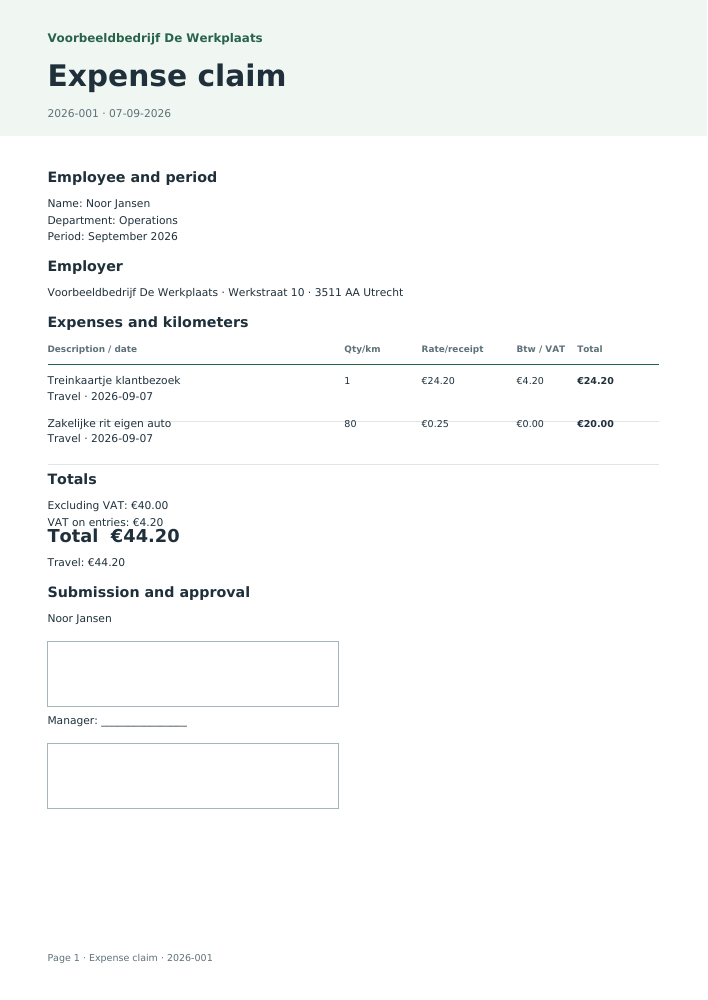
    Voorbeeldbedrijf De Werkplaats

    Expense claim

    № 2026-00107-09-2026

    Employer / recipient

    Voorbeeldbedrijf De Werkplaats

    Werkstraat 10
    3511 AA Utrecht

    Employee

    Noor Jansen

    Operations
    September 2026

    DescriptionQtyTotal incl.
    Treinkaartje klantbezoekTravel · 2026-09-071€24.20
    Zakelijke rit eigen autoTravel · 2026-09-0780 km€20.00
    Total€44.20

    Including VAT €4.20

    Signature · Noor Jansen
    Approved by ·
    Expense claim · Based on your inputs
    Excluding VAT
    €40.00
    VAT on entries
    €4.20
    Travel
    €44.20

    Line breakdown

    DateDescriptionCategoryQuantity / kmRate €Excl. VAT €VAT €Total €
    2026-09-07Treinkaartje klantbezoekTravel124.2020.004.2024.20
    2026-09-07Zakelijke rit eigen autoTravel800.2520.000.0020.00
    Assumptions, sources and version

    2026 · nl-2026.1 · v2026.1

    • Receipt amounts include VAT; kilometer entries have no VAT. The 2026 tax-free maximum is €0.25 per business kilometer. Higher entered rates are flagged separately.
    • The VAT breakdown follows the receipt and does not establish deductibility. The employer remains responsible for approval and expense policy.

    Keep your documents together

    With Access: your branding, sequential numbering, document archive and direct email. The standard PDF above is free.

    Explore Access →

    Rather outsource it?

    Want receipts and bank handled?

    You send your receipts and purchase invoices. Winstwaker processes them, matches them to your bank transactions and flags anything missing.

    See processing by Winstwaker ↗
    Bulk · Calculate your entire list
    Save on this device for free

    Understand your result

    How this tool works

    An expense claim requests reimbursement of business costs paid by an employee. Enter name, department and claim period, then copy each expense from its receipt. Travel, meals, accommodation, office and other costs have separate totals so the employer can compare the figures and evidence with the expense policy.

    Choose either a receipt amount or mileage reimbursement for each line. Enter receipt amounts including VAT; the breakdown uses the selected rate. Mileage is distance multiplied by the chosen rate without VAT. The form provides employee and manager signature spaces, but does not automatically approve costs or establish tax deductibility.

    Mileage reimbursement in 2026

    Mileage reimbursement = business kilometers × reimbursement per kilometer

    The 2026 tax-free maximum was increased to €0.25 per business kilometer. The tool uses that as its default. Enter a different agreed rate if needed. Above €0.25, the claim retains the actual amount and shows the excess over the tax-free maximum. Payroll must determine how to process that excess. For entries outside 2026, check the rate applicable on that date.

    Combining receipts and exporting

    Add up to ten PDF, JPG or PNG attachments totalling at most 10 MB. Visible pages are appended after the claim summary; check that each receipt is legible. PDF attachments must not be encrypted. The complete document supports up to one hundred pages. Payroll CSV contains employee, period, category, date, kilometers, rate and amounts. Bulk processing groups multiple claims by month while preserving individual employee records.

    Personal details and approval

    Entered details and signatures remain on this device while you create the document. Archiving with Access stores it encrypted in your account. Before emailing, review the archived version and the recipient’s address. Save, print or send the free PDF yourself.

    Sample PDF: Expense claim form
    View the worked example

    This document was generated using the tool’s fictional example details. Your download contains your own entries.

    Download sample · PDF

    Common questions

    What details does an expense claim need?

    Employee, department, period and each expense’s date, business purpose, category and amount. Attach receipts and follow the employer’s approval procedure.

    What is the 2026 tax-free mileage rate?

    The maximum is €0.25 per business kilometer. Employers may agree a different amount; reimbursement above the maximum is not automatically tax-free.

    Can I attach receipt photos?

    Yes, use JPG, PNG or PDF. Add at most ten files totalling 10 MB. Check that date, supplier and amounts are readable.

    Is VAT on claimed expenses always deductible?

    No. The tool splits entered amounts but does not assess invoice requirements, business purpose or deduction restrictions. Ask your accounts team to check.

    Can I use the expense claim in Excel?

    The free payroll CSV opens in Excel. Access adds Excel export and archiving. Credit-based bulk processing provides individual files and a PDF bundle for each selected month.

    Which details do you need?
    • Employee name
    • Department
    • Claim period
    • Expenses and kilometers
    • Receipts and attachments
    • Company name
    • Company address
    • Company postcode and city
    • Date
    • Document number
    • Employee reference (optional)
    • Payment IBAN (optional)
    • Notes
    • Employee signature
    • Approving manager name
    • Manager signature
    Limits of this tool
    • Receipt amounts include VAT; kilometer entries have no VAT. The 2026 tax-free maximum is €0.25 per business kilometer. Higher entered rates are flagged separately.
    • The VAT breakdown follows the receipt and does not establish deductibility. The employer remains responsible for approval and expense policy.

    Year: 2026 · Version 2026.1

    Sources for this tool

    Prepared by the Rekenbox product team at Winstwaker. The listed source references and calculation version make the method traceable. Report a content error Last updated: 2026-09-07. Rekenbox is a product by Winstwaker. The tool applies a calculation model to your inputs; a result or paid report is not a personal assessment by an adviser.