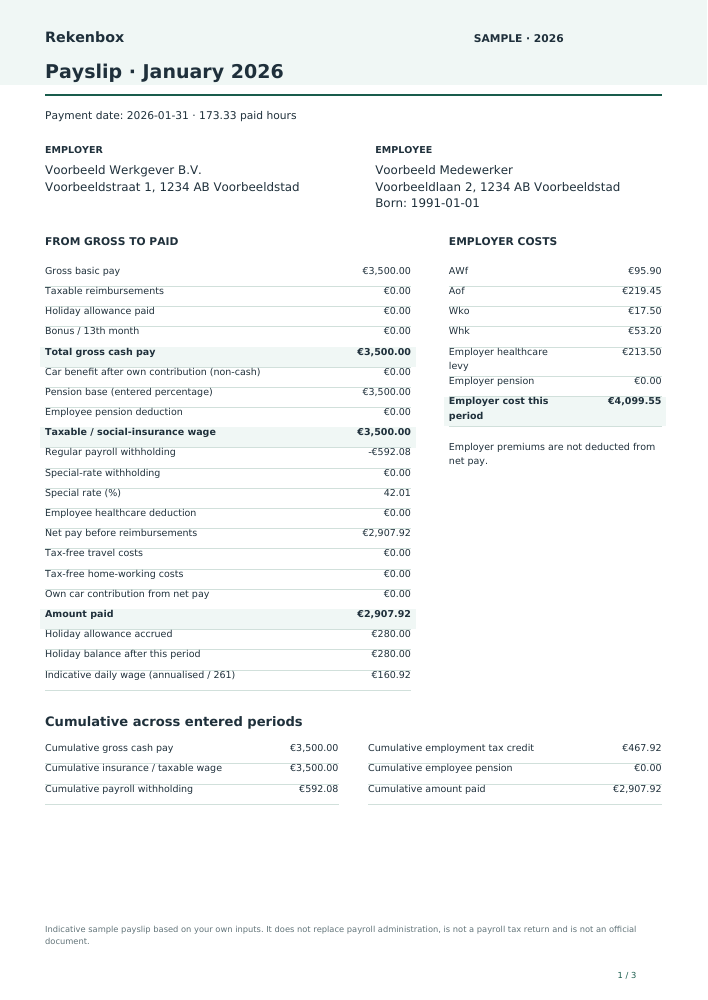
Indicative sample payslip based on your own inputs. It does not replace payroll administration, is not a payroll tax return and is not an official document.
Gross cash pay What is this?
Basic salary, taxable allowances, bonuses and holiday allowance paid. The company-car benefit is non-cash pay and is added separately to the taxable base.
Pension What is this?
Your entered percentage of the gross cash wage shown. Employee contributions reduce both net pay and the taxable/social-insurance base. An actual pension scheme may use a deductible, ceiling and different wage components.
Insurance wage and car benefit What is this?
Taxable pay after deductible pension. It includes private company-car benefit after the employee contribution for private use. Tax-free reimbursements and accrued but unpaid holiday allowance are excluded.
Payroll withholding What is this?
The 2026 white monthly or four-week table applies to regular taxable pay. The special rate uses the separately entered annual special-rate wage for bonuses and holiday allowance paid. These are advance income-tax payments.
Healthcare and employer contributions What is this?
For this ordinary employee the employer pays AWf, Aof, Whk, Wko and the healthcare levy. No healthcare contribution is deducted from net pay. The employer may have different rates or an insurance exception.
Holiday balance What is this?
Opening balance plus accrual, less payments. Accrual is a reserve and does not reduce net pay. On payment it is included in cash pay and special-rate withholding. A negative balance can mean an opening balance is missing.
Cumulatives and daily wage What is this?
Cumulatives include only the periods entered. Employer contributions use the cumulative wage base and the number of complete entered payroll periods. Daily wage is an indicative annualisation divided by 261; UWV has additional reference-period and benefit rules.
Period
January 2026
Payment date
2026-01-31
Social-insurance wage
€3,500.00
Employer cost this period
€4,099.55
Assumptions, sources and version
2026 · nl-2026.1 · v2026.1
Indicative sample payslip based on your own inputs. It does not replace payroll administration, is not a payroll tax return and is not an official document.
Dutch resident, ordinarily insured employee, 2026 white table. Excludes directors, expat rulings, special withholding situations, retroactive corrections and payroll tax filing. Pension percentages are your inputs, not pension-scheme advice.
Contributions appear on the employer side. At state-pension age the employer healthcare levy remains; employee-insurance premiums stop from payments in the state-pension month. Contribution ceilings follow official period amounts and cumulative calculation over entered periods.
The daily wage shown is an estimate: entered social-insurance wage annualised and divided by 261. UWV uses a specific reference period and additional rules.
Transfer annual base salary and holiday allowance to the employer statement. Check contractual payments and structural allowances with the employer; a one-off bonus is not transferred automatically.
Bulk · Calculate your entire listSave on this device for free
Understand your result
How this tool works
A sample payslip shows how gross pay, deductions and reimbursements combine into a payment. This free payslip generator uses the white Dutch payroll tax tables for 2026 and presents entered components in a recognisable Dutch layout. Employee pay appears on the left and employer costs separately. The example helps you understand wage components and prepare a discussion with a payroll administrator.
First choose monthly or four-weekly payroll, the period and payment date. Enter gross basic pay and paid hours. Date of birth and the payroll tax-credit choice determine the applicable table column. The model assumes an ordinarily insured employee living in the Netherlands. Directors, expat relief and other special situations require additional rules which this sample payslip does not implement.
Next enter employer and employee details. The initial names and addresses are fictional. A citizen service number is optional; only the final four digits can be entered and these are displayed masked. Without an account, this BSN input is not stored in local scenarios or on the server. The free PDF is created on your own device. Existing access lets you retain employee records with versions and branding.
Add fixed or collective-agreement supplements as individual rows. Indicate which supplements count towards holiday accrual. Employee pension is a percentage you supply over the displayed gross cash pay, without an automatic pension threshold or scheme formula. Holiday allowance can accrue or be paid; a bonus in the same period is processed alongside holiday pay using the special-payment table.
A company car benefit increases taxable and social-insurance wage but is not extra cash paid by the employer. An employee contribution for private use is processed separately. Travel and home-working reimbursements remain outside withholding up to the applied exempt amounts; entering a higher rate creates a taxable portion. Check yourself that both daily exemptions are not claimed for the same commuting day.
With existing access, enter consecutive periods, compare them and create an annual statement when all twelve months or thirteen four-week periods are complete. Cumulative figures include only periods actually entered. Employer contributions follow the selected contract and employer settings and period ceilings. This indicative sample payslip does not replace payroll administration, file a payroll tax return or constitute an official document. The same statement appears on every page of the PDF.
Spot SV-loon · fictional monthly example
Gross cash salary
€ 3.500,00
Taxable company-car benefit
+ € 500,00
Deductible pension contribution
− € 150,00
Loon werknemersverzekeringen (SV-loon)
€ 3.850,00
Find this wage base on your own payslip. This simplified example excludes other pay components and is not an official payslip.
Gross is pay before deductions. Taxable pay is the payroll-tax base; SV-loon is the employee-insurance base. They match in this example, but check your own payslip. Net pay is the payment after deductions and any reimbursements.
Car benefit belongs to the tax base. AWf, Aof, Whk and Zvw appear in the employer column.
Social-insurance wage and daily wage
Insurance wage = taxable salary including net company car benefit
Daily wage is an annualised estimate divided by 261. UWV determines the official reference period and adjustments.
Limits of this tool
Indicative sample payslip, not an official document
This does not replace payroll administration or file a payroll return. Pension, Whk and collective-agreement components require your own data.
Fictional employee; generated with the current payroll engine. Notes and sources are included in the PDF.View sample payslip · PDF
Common questions
Can I make a payslip myself?
You can create an indicative sample here. An employer remains responsible for accurate payroll records, required details and filing.
What is social-insurance wage on a payslip?
It is the wage used for employee insurance. In this ordinary model it includes taxable pay and car benefit after own contribution, less deductible pension.
What is the special-payment tax rate?
It is the table for payments such as bonuses and separately paid holiday allowance. Use the special-rate annual wage from payroll records; zero uses an explicit estimate.
Is my BSN stored?
Not without an account. Only the final four digits are accepted; local scenarios and guest storage remove them. The PDF displays only a masked number.
When can I create an annual statement?
With access, after all twelve months or thirteen four-week periods starting at period one have been entered. Missing periods are never invented.
Which details do you need?
Payroll period
Period number in 2026
Payment date (blank = period end)
Gross pay in this period
Paid hours in this period — Use actual paid hours for the minimum-wage check; monthly hours vary.
Employee date of birth
Apply payroll tax credit
Employer name
Employer address
Employee name
Employee address
Employee reference (optional)
BSN: last 4 digits only (optional) — We never request your full BSN. The PDF shows only ***** followed by these four digits. Without an account these digits are never saved.
Taxable allowances
Employee pension contribution (%) — Your chosen percentage on cash gross pay, including allowances, holiday allowance paid and bonuses. No automatic pension deductible or scheme rules.
Employer pension contribution on the same base (%)
Holiday allowance in this period
Holiday balance before the first entered period
Holiday accrual (%)
Gross holiday allowance paid
Special payment: bonus or 13th month
Special-rate annual wage — Use the employer’s special-rate annual wage, usually last year’s taxable wage, annualised where required. This field is not set equal to this bonus.
Gross company-car benefit in this period — Use the car-benefit calculator or your payslip. The benefit also increases social-insurance wage; it is not cash pay.
Employee private-car contribution from net pay
Business / commuting kilometres in this period
Reimbursement per kilometre — In 2026 up to €0.25 per kilometre is exempt. Any excess is treated as taxable pay.
Home-working days in this period — Do not claim a home-working exemption on days with exempt commuting costs. A business trip may qualify alongside it under the applicable conditions.
Reimbursement per home-working day — Up to €2.45 per day is exempt in 2026; excess is taxable pay.
AWf contribution under contract
Employer for Aof
Whk percentage from employer decision (%)
Calculate multiple periods
Periods: other settings stay unchanged — Consecutive complete payroll periods with the same employer. Cumulatives start at the first period entered. Adjust amounts per row. An annual statement needs all 12 months or 13 four-week periods.
Limits of this tool
Indicative sample payslip based on your own inputs. It does not replace payroll administration, is not a payroll tax return and is not an official document.
Dutch resident, ordinarily insured employee, 2026 white table. Excludes directors, expat rulings, special withholding situations, retroactive corrections and payroll tax filing. Pension percentages are your inputs, not pension-scheme advice.
Contributions appear on the employer side. At state-pension age the employer healthcare levy remains; employee-insurance premiums stop from payments in the state-pension month. Contribution ceilings follow official period amounts and cumulative calculation over entered periods.
The daily wage shown is an estimate: entered social-insurance wage annualised and divided by 261. UWV uses a specific reference period and additional rules.
Prepared by the Rekenbox product team at Winstwaker. The listed source references and calculation version make the method traceable. Report a content errorLast updated: 2026-09-06. Rekenbox is a product by Winstwaker. The tool applies a calculation model to your inputs; a result or paid report is not a personal assessment by an adviser.