

Rekenbox · 2026
Your financial year in one clear report.
Combine income, costs, profit and ledger balances in one clear report.Start with your own figures or try an example. You only pay when you want to unlock the full PDF report. No account or subscription needed.
- Your figures
- Free preview
- Pay
- Your report
Understand your result
How this tool works
Turn postings from your XAF export into a financial overview. The report combines income, costs and profit by month, an income-statement account breakdown and ledger balances with opening balances and movements. The period follows your export; an interim export produces an interim overview. Review account classification and closing entries. This summarises your accounts; it is not a statutory financial statement or tax return.
Balance sheet example
A balance sheet shows assets, equity and liabilities at one date. The balance-builder example has €60,000 on each side. Use the balance builder for manual entry; the XAF overview follows account balances and movements in the selected file.
Income statement example
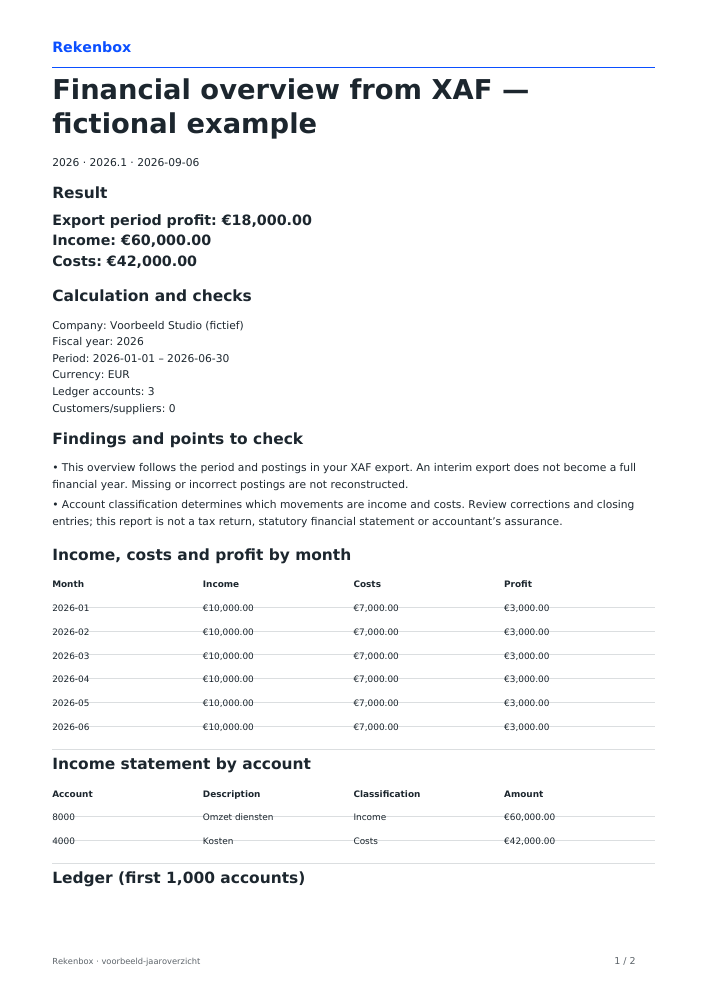
The fictional example export covers January through June 2026: €60,000 income, €42,000 costs and €18,000 profit. It is a period overview. Calling it annual accounts does not make it a full-year result. View the example output and download the PDF below.
Common questions
Is this a statutory financial statement?
No. You receive a financial overview of your XAF postings with checks and source references. Valuations, tax adjustments and an accountant’s assurance are not added. A partial year remains a partial overview.
Which files can I use?
A XAF 3.0, 3.1, 3.2 or 4.0 export in EUR from software supporting Auditfile Financieel. Up to 10 MB and 1,000 ledger accounts. The report uses your export period, transactions and any available opening balance.
Can I create a balance sheet myself?
Yes. Use the separate builder with book values from the same date. Check that assets equal equity plus liabilities.
Does this create statutory annual accounts?
It organises your figures but does not add missing year-end entries, accounting policies, notes or assurance. Check exactly what the recipient requires.
Which details do you need?
- Choose a file — XAF 3.0, 3.1, 3.2 or 4.0 in EUR · up to 10 MB.
- Account classification
Limits of this tool
- This overview follows the period and postings in your XAF export. An interim export does not become a full financial year. Missing or incorrect postings are not reconstructed.
- Account classification determines which movements are income and costs. Review corrections and closing entries; this report is not a tax return, statutory financial statement or accountant’s assurance.
Year: 2026 · Version 2026.1
Sources for this tool
- Belastingdienst — Auditfile Financieel · calculation source checked 2026-09-05
Prepared by the Rekenbox product team at Winstwaker. The listed source references and calculation version make the method traceable. Report a content error Last updated: 2026-09-06. Rekenbox is a product by Winstwaker. The tool applies a calculation model to your inputs; a result or paid report is not a personal assessment by an adviser.